> ## Documentation Index
> Fetch the complete documentation index at: https://docs.lettr.com/llms.txt
> Use this file to discover all available pages before exploring further.
# Contact Language
> Store each contact's language in a property, designate it as the communication language, and learn exactly how Lettr matches values like de, en-US, german or Français to a template language.
Lettr needs to know which language each contact wants. That information lives in a [custom property](/learn/audience/contacts#custom-properties) on the contact, and Lettr reads it at send time to pick the right version. This page covers where Lettr looks for the property, how it interprets the values, and what happens when a value is missing or unrecognised.
## Which Property Holds the Language
There are two ways to tell Lettr where the language is. Use the first one whenever you can.
### Designate a property
When you create or edit a property under **Audience** → **Properties**, tick **Use as communication language**. The property then shows a **Communication language** badge in the list, and campaigns read the language from it and nothing else.
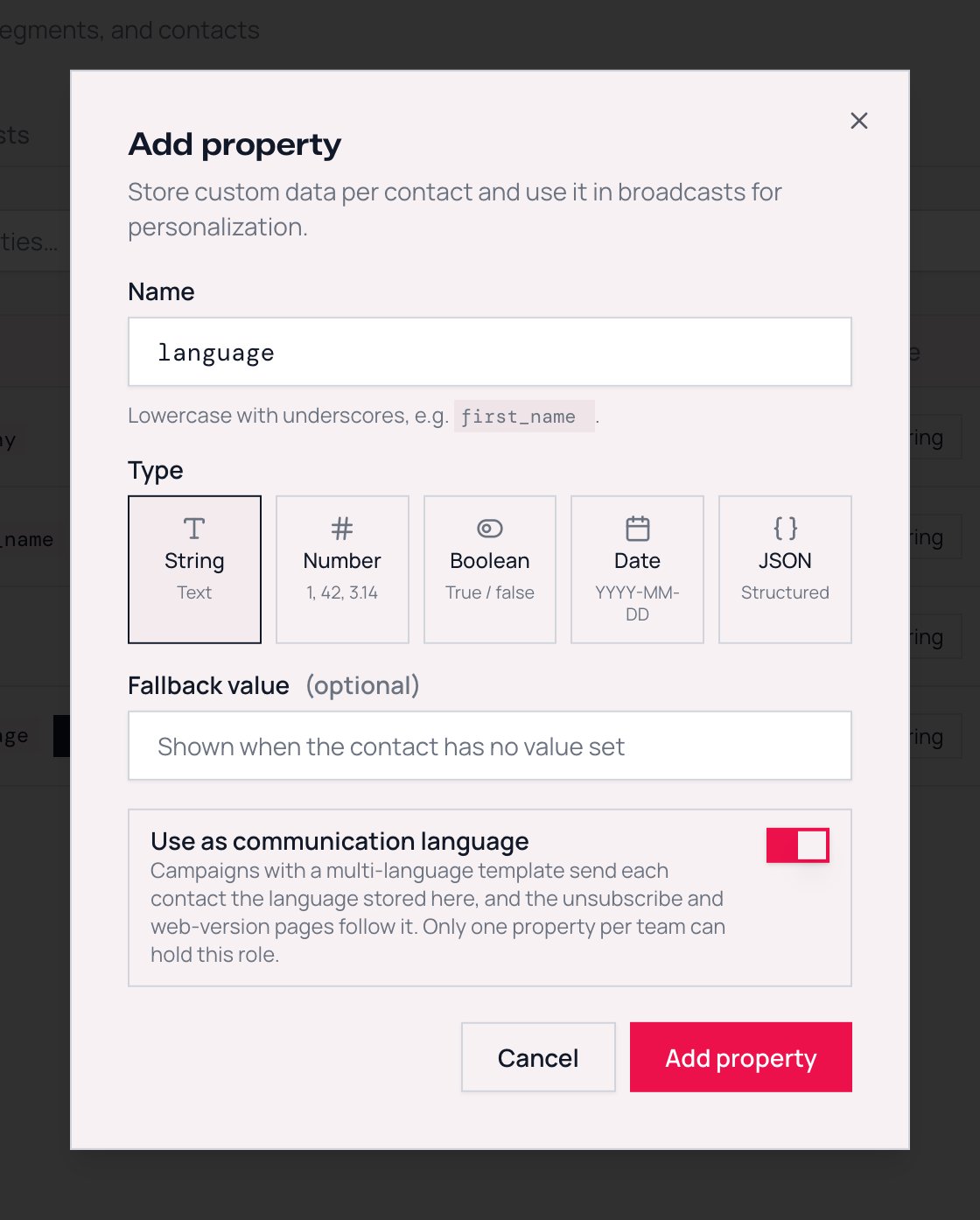 A team can designate only one property. Ticking the switch on a second property moves the role to that property. The first one keeps its values and simply stops being the language source.
The same language source also sets the language of the hosted [Manage email preferences](/learn/audience/email-preferences) page and the unsubscribe page, so one setting covers every recipient-facing surface. See [The language of hosted pages](#the-language-of-hosted-pages).
If you delete the designated property, Lettr does not warn you. It goes back to finding the language by name, and if no property has one of those names, every recipient gets the primary language. Check the review panel of your next campaign after removing or replacing a language property.
### Or let Lettr find it by name
If no property is designated, Lettr looks for the language under these property names, in this order:
1. `communication_language`
2. `communication_lang`
3. `language`
4. `lang`
5. `locale`
The lookup runs for each contact separately, and the first name that holds a value wins. A contact with an empty `language` but `locale` set to `de` still receives German. The Review & Send panel names the first of these properties your team has defined, and tells you which case you are in: **designated language property** or **matched by property name**.
This is why a CSV imported with a `lang` column routes campaigns correctly without any setup. Property names are always lowercase, so the names match exactly as written above. A CSV column called `Language` works once you map it to a property named `language`.
Name matching is a convenience for getting started. Designate the property once you rely on it. It removes the ambiguity when you later add a second property with a language-like name, and it makes the review panel unambiguous for everyone on the team.
The property must be a `string` property. The **Use as communication language** switch is offered for every property type and no error is shown, but values stored in a `number`, `boolean`, `date` or `json` property are ignored. Designating one of those sends every recipient the primary language. A property's type cannot be changed later, so create a new `string` property and move the values over.
## How Values Are Matched
Language values in real audiences are messy. One import has `de`, another has `de_DE`, a signup form wrote `German`, and someone typed `Deutsch` by hand. Lettr accepts all of them.
For each recipient, Lettr takes the property value and compares it with the languages the template has, from the strictest rule to the loosest. The first rule that matches wins.
| Rule | What it does | Example with a template in `de`, `en` and `fr` |
| ---------------------------- | -------------------------------------------------------------------------- | ------------------------------------------------------------------------- |
| **1. Same tag** | Case, surrounding spaces and `_` versus `-` are ignored | `DE`, `de `, `De` all match `de` |
| **2. Same base language** | The region part is dropped, in both directions | `de-AT` and `de_ch` match `de`. `en-US` and `en_GB` both match `en` |
| **3. Same language by name** | The value and the template language are looked up in the alias table below | `german`, `Deutsch`, `ger` match `de`. `Français` and `french` match `fr` |
Before comparing, Lettr trims spaces around the value. A value made only of spaces counts as empty. Each contact has one language: a list such as `de,en` matches nothing and gets the primary language.
Rule 2 means regional variants reach their base language. Templates built in the editor use two-letter [language codes](/learn/multilingual-campaigns/how-template-languages-work#language-codes), so a contact stored as `pt-BR` and one stored as `pt-PT` both receive the `pt` version.
### Accepted spellings
Rule 3 uses this table. Matching is case-insensitive. A value that is not in the table and is not a language tag with a matching base falls through to the primary language.
| Language | Code | Accepted spellings |
| ---------- | ---- | ---------------------------------------------------------------------------------- |
| Chinese | `zh` | `zh`, `zho`, `chi`, `chinese`, `mandarin`, `zh-cn`, `zh-hans`, `中文`, `简体中文` |
| Czech | `cs` | `cs`, `cz`, `cze`, `ces`, `czech`, `cesky`, `česky`, `čeština` |
| Dutch | `nl` | `nl`, `nld`, `dut`, `dutch`, `nederlands`, `flemish` |
| English | `en` | `en`, `eng`, `english` |
| Finnish | `fi` | `fi`, `fin`, `finnish`, `suomi` |
| French | `fr` | `fr`, `fra`, `fre`, `french`, `francais`, `français` |
| German | `de` | `de`, `deu`, `ger`, `german`, `deutsch`, `germany` |
| Italian | `it` | `it`, `ita`, `italian`, `italiano` |
| Japanese | `ja` | `ja`, `jpn`, `jp`, `japanese`, `nihongo`, `日本語` |
| Korean | `ko` | `ko`, `kor`, `korean`, `hangul`, `한국어` |
| Polish | `pl` | `pl`, `pol`, `polish`, `polski` |
| Portuguese | `pt` | `pt`, `por`, `portuguese`, `portugues`, `português`, `pt-br`, `pt-pt`, `brazilian` |
| Romanian | `ro` | `ro`, `ron`, `rum`, `romanian`, `romana`, `română` |
| Russian | `ru` | `ru`, `rus`, `russian`, `русский` |
| Slovak | `sk` | `sk`, `slk`, `slo`, `slovak`, `slovencina`, `slovenčina`, `slovensky` |
| Spanish | `es` | `es`, `spa`, `spanish`, `espanol`, `español`, `castellano` |
| Swedish | `sv` | `sv`, `swe`, `swedish`, `svenska` |
| Turkish | `tr` | `tr`, `tur`, `turkish`, `turkce`, `türkçe` |
| Vietnamese | `vi` | `vi`, `vie`, `vietnamese`, `tieng viet`, `tiếng việt` |
These are also the 19 languages the automatic unsubscribe footer and the hosted pages are translated into. See [What recipients get](/learn/multilingual-campaigns/sending-and-results#what-each-recipient-gets).
Languages outside this table still work under rules 1 and 2. A template with a `hu` version and contacts with `hu` or `hu-HU` route correctly. Only the name-based spellings such as `hungarian` are unavailable for them.
## What Happens With No Match
A recipient receives the **primary language** of the template when:
* the language property is empty or missing on their contact, or
* the value matches none of the template's languages under the three rules, for example `it` when the template has no Italian version, or a typo like `germn`.
Nobody is skipped. Every recipient gets an email, and the Review & Send panel counts these two cases separately and shows them before sending: how many have no value, and which unmatched values appear and how often. See [The review panel](/learn/multilingual-campaigns/campaign-setup#the-review-panel).
This is different from the contact's [fallback value](/learn/audience/contacts#fallback-values). A property fallback fills in a merge tag when a contact has no value. The primary-language fallback decides which version of the email a contact receives. Setting a fallback value of `en` on your language property does not route contacts to English. Only the contact's own value counts.
## The Language of Hosted Pages
The [Manage email preferences](/learn/audience/email-preferences) page and the unsubscribe page are hosted by Lettr and exist in the same 19 languages. They use the same language source as campaigns, designated or found by name, and pick the language in this order:
1. The contact's language value, when it is one of the 19 languages.
2. The team's **Default communication language**, set under **Settings** → **Team**.
3. English.
A contact with `hu` therefore gets a Hungarian email if the template has one, but sees the hosted pages in your team's default language. If most of your audience does not speak English, set the team default to the language they do speak.
The web version of a multilingual campaign is different: it always shows the language version that was sent to that recipient.
## Setting the Value
The language is an ordinary property value, so every way of writing contact data works:
* **Dashboard**: edit the contact and set the property.
* **CSV import**: map the column to your language property in the [import flow](/learn/audience/importing-and-exporting). A column named `lang` or `language` can be mapped to a property of the same name and needs no further setup.
* **API**: pass it in `properties` when you [create](/api-reference/audience/create-a-contact), [update](/api-reference/audience/update-a-contact) or [bulk create](/api-reference/audience/bulk-create-contacts) contacts. The property has to exist first. A key your team has not defined is rejected with `One or more property keys are not registered for your team.`, so create the property, then the contacts.
```bash theme={null}
curl -X POST https://app.lettr.com/api/audience/contacts \
-H "Authorization: Bearer lttr_your_api_key" \
-H "Content-Type: application/json" \
-d '{
"email": "anna@example.com",
"properties": {
"language": "de"
}
}'
```
### Designating the property through the API
The **Use as communication language** switch is the `purpose` field on the property. Pass `"communication_language"` when you [create](/api-reference/audience/create-a-property) or [update](/api-reference/audience/update-a-property) a property. When updating, send `null` to remove the designation, or leave `purpose` out to keep it as it is.
```bash theme={null}
curl -X POST https://app.lettr.com/api/audience/properties \
-H "Authorization: Bearer lttr_your_api_key" \
-H "Content-Type: application/json" \
-d '{
"name": "language",
"type": "string",
"purpose": "communication_language"
}'
```
## Finding Contacts Without a Language
[Segments](/learn/audience/segments) have **is empty** and **is not empty** operators. A segment with the condition `language is empty` lists every contact who would receive the primary language for lack of a value. Fix them before the send, or use the segment to exclude them, or accept the fallback. The review panel shows the count either way, and its count is the one to trust: a value made only of spaces is not caught by **is empty**, but it still counts as no language when the campaign is sent.
## Next Steps
Per-language subject and sender, the review panel, and test sends
Property types, fallback values, and how properties become merge tags
A team can designate only one property. Ticking the switch on a second property moves the role to that property. The first one keeps its values and simply stops being the language source.
The same language source also sets the language of the hosted [Manage email preferences](/learn/audience/email-preferences) page and the unsubscribe page, so one setting covers every recipient-facing surface. See [The language of hosted pages](#the-language-of-hosted-pages).
If you delete the designated property, Lettr does not warn you. It goes back to finding the language by name, and if no property has one of those names, every recipient gets the primary language. Check the review panel of your next campaign after removing or replacing a language property.
### Or let Lettr find it by name
If no property is designated, Lettr looks for the language under these property names, in this order:
1. `communication_language`
2. `communication_lang`
3. `language`
4. `lang`
5. `locale`
The lookup runs for each contact separately, and the first name that holds a value wins. A contact with an empty `language` but `locale` set to `de` still receives German. The Review & Send panel names the first of these properties your team has defined, and tells you which case you are in: **designated language property** or **matched by property name**.
This is why a CSV imported with a `lang` column routes campaigns correctly without any setup. Property names are always lowercase, so the names match exactly as written above. A CSV column called `Language` works once you map it to a property named `language`.
Name matching is a convenience for getting started. Designate the property once you rely on it. It removes the ambiguity when you later add a second property with a language-like name, and it makes the review panel unambiguous for everyone on the team.
The property must be a `string` property. The **Use as communication language** switch is offered for every property type and no error is shown, but values stored in a `number`, `boolean`, `date` or `json` property are ignored. Designating one of those sends every recipient the primary language. A property's type cannot be changed later, so create a new `string` property and move the values over.
## How Values Are Matched
Language values in real audiences are messy. One import has `de`, another has `de_DE`, a signup form wrote `German`, and someone typed `Deutsch` by hand. Lettr accepts all of them.
For each recipient, Lettr takes the property value and compares it with the languages the template has, from the strictest rule to the loosest. The first rule that matches wins.
| Rule | What it does | Example with a template in `de`, `en` and `fr` |
| ---------------------------- | -------------------------------------------------------------------------- | ------------------------------------------------------------------------- |
| **1. Same tag** | Case, surrounding spaces and `_` versus `-` are ignored | `DE`, `de `, `De` all match `de` |
| **2. Same base language** | The region part is dropped, in both directions | `de-AT` and `de_ch` match `de`. `en-US` and `en_GB` both match `en` |
| **3. Same language by name** | The value and the template language are looked up in the alias table below | `german`, `Deutsch`, `ger` match `de`. `Français` and `french` match `fr` |
Before comparing, Lettr trims spaces around the value. A value made only of spaces counts as empty. Each contact has one language: a list such as `de,en` matches nothing and gets the primary language.
Rule 2 means regional variants reach their base language. Templates built in the editor use two-letter [language codes](/learn/multilingual-campaigns/how-template-languages-work#language-codes), so a contact stored as `pt-BR` and one stored as `pt-PT` both receive the `pt` version.
### Accepted spellings
Rule 3 uses this table. Matching is case-insensitive. A value that is not in the table and is not a language tag with a matching base falls through to the primary language.
| Language | Code | Accepted spellings |
| ---------- | ---- | ---------------------------------------------------------------------------------- |
| Chinese | `zh` | `zh`, `zho`, `chi`, `chinese`, `mandarin`, `zh-cn`, `zh-hans`, `中文`, `简体中文` |
| Czech | `cs` | `cs`, `cz`, `cze`, `ces`, `czech`, `cesky`, `česky`, `čeština` |
| Dutch | `nl` | `nl`, `nld`, `dut`, `dutch`, `nederlands`, `flemish` |
| English | `en` | `en`, `eng`, `english` |
| Finnish | `fi` | `fi`, `fin`, `finnish`, `suomi` |
| French | `fr` | `fr`, `fra`, `fre`, `french`, `francais`, `français` |
| German | `de` | `de`, `deu`, `ger`, `german`, `deutsch`, `germany` |
| Italian | `it` | `it`, `ita`, `italian`, `italiano` |
| Japanese | `ja` | `ja`, `jpn`, `jp`, `japanese`, `nihongo`, `日本語` |
| Korean | `ko` | `ko`, `kor`, `korean`, `hangul`, `한국어` |
| Polish | `pl` | `pl`, `pol`, `polish`, `polski` |
| Portuguese | `pt` | `pt`, `por`, `portuguese`, `portugues`, `português`, `pt-br`, `pt-pt`, `brazilian` |
| Romanian | `ro` | `ro`, `ron`, `rum`, `romanian`, `romana`, `română` |
| Russian | `ru` | `ru`, `rus`, `russian`, `русский` |
| Slovak | `sk` | `sk`, `slk`, `slo`, `slovak`, `slovencina`, `slovenčina`, `slovensky` |
| Spanish | `es` | `es`, `spa`, `spanish`, `espanol`, `español`, `castellano` |
| Swedish | `sv` | `sv`, `swe`, `swedish`, `svenska` |
| Turkish | `tr` | `tr`, `tur`, `turkish`, `turkce`, `türkçe` |
| Vietnamese | `vi` | `vi`, `vie`, `vietnamese`, `tieng viet`, `tiếng việt` |
These are also the 19 languages the automatic unsubscribe footer and the hosted pages are translated into. See [What recipients get](/learn/multilingual-campaigns/sending-and-results#what-each-recipient-gets).
Languages outside this table still work under rules 1 and 2. A template with a `hu` version and contacts with `hu` or `hu-HU` route correctly. Only the name-based spellings such as `hungarian` are unavailable for them.
## What Happens With No Match
A recipient receives the **primary language** of the template when:
* the language property is empty or missing on their contact, or
* the value matches none of the template's languages under the three rules, for example `it` when the template has no Italian version, or a typo like `germn`.
Nobody is skipped. Every recipient gets an email, and the Review & Send panel counts these two cases separately and shows them before sending: how many have no value, and which unmatched values appear and how often. See [The review panel](/learn/multilingual-campaigns/campaign-setup#the-review-panel).
This is different from the contact's [fallback value](/learn/audience/contacts#fallback-values). A property fallback fills in a merge tag when a contact has no value. The primary-language fallback decides which version of the email a contact receives. Setting a fallback value of `en` on your language property does not route contacts to English. Only the contact's own value counts.
## The Language of Hosted Pages
The [Manage email preferences](/learn/audience/email-preferences) page and the unsubscribe page are hosted by Lettr and exist in the same 19 languages. They use the same language source as campaigns, designated or found by name, and pick the language in this order:
1. The contact's language value, when it is one of the 19 languages.
2. The team's **Default communication language**, set under **Settings** → **Team**.
3. English.
A contact with `hu` therefore gets a Hungarian email if the template has one, but sees the hosted pages in your team's default language. If most of your audience does not speak English, set the team default to the language they do speak.
The web version of a multilingual campaign is different: it always shows the language version that was sent to that recipient.
## Setting the Value
The language is an ordinary property value, so every way of writing contact data works:
* **Dashboard**: edit the contact and set the property.
* **CSV import**: map the column to your language property in the [import flow](/learn/audience/importing-and-exporting). A column named `lang` or `language` can be mapped to a property of the same name and needs no further setup.
* **API**: pass it in `properties` when you [create](/api-reference/audience/create-a-contact), [update](/api-reference/audience/update-a-contact) or [bulk create](/api-reference/audience/bulk-create-contacts) contacts. The property has to exist first. A key your team has not defined is rejected with `One or more property keys are not registered for your team.`, so create the property, then the contacts.
```bash theme={null}
curl -X POST https://app.lettr.com/api/audience/contacts \
-H "Authorization: Bearer lttr_your_api_key" \
-H "Content-Type: application/json" \
-d '{
"email": "anna@example.com",
"properties": {
"language": "de"
}
}'
```
### Designating the property through the API
The **Use as communication language** switch is the `purpose` field on the property. Pass `"communication_language"` when you [create](/api-reference/audience/create-a-property) or [update](/api-reference/audience/update-a-property) a property. When updating, send `null` to remove the designation, or leave `purpose` out to keep it as it is.
```bash theme={null}
curl -X POST https://app.lettr.com/api/audience/properties \
-H "Authorization: Bearer lttr_your_api_key" \
-H "Content-Type: application/json" \
-d '{
"name": "language",
"type": "string",
"purpose": "communication_language"
}'
```
## Finding Contacts Without a Language
[Segments](/learn/audience/segments) have **is empty** and **is not empty** operators. A segment with the condition `language is empty` lists every contact who would receive the primary language for lack of a value. Fix them before the send, or use the segment to exclude them, or accept the fallback. The review panel shows the count either way, and its count is the one to trust: a value made only of spaces is not caught by **is empty**, but it still counts as no language when the campaign is sent.
## Next Steps
Per-language subject and sender, the review panel, and test sends
Property types, fallback values, and how properties become merge tags