

The Three Pieces
Three things work together. Each has its own page in this section.A template with languages
Add languages to a template in the email editor. Do this first: a campaign can only send the languages its template has.
A contact language property
A property on each contact that says which language they want. Designate one, or let Lettr find it by name.
The campaign
Optional per-language subject and sender, a review panel that shows who gets what, and test sends in any language.
How a Send Works
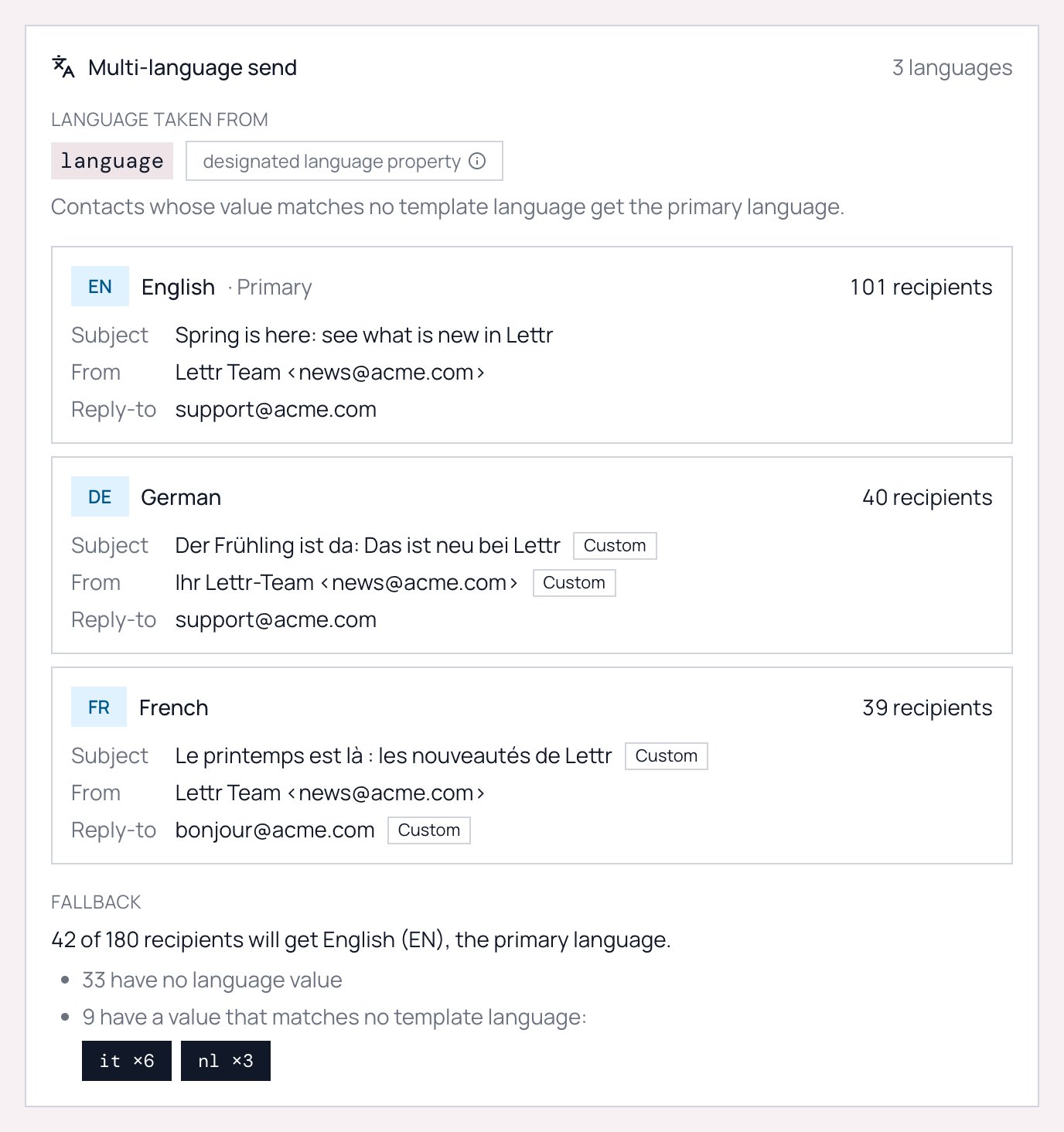
When a multilingual campaign starts, Lettr reads each recipient’s language property and matches it against the languages the template has:- A contact with
degets the German version. A contact withde-ATorgermangets it too. Matching is forgiving; see how values are matched. - A contact with no value, or a value that matches no template language, gets the primary language. Everyone receives an email.
- Each recipient gets their language’s content, subject, sender and reply-to, an unsubscribe footer in the same language as the email, and a web version in that language too.
- When a recipient clicks the unsubscribe link, the hosted unsubscribe and preferences page opens in their language as well. The translation does not stop at the email.
Quick Start
1
Make the template multilingual
Open a marketing template in the editor and click Create mutation in the top bar. Add the language the template is written in first (it becomes the primary), then add each translation and translate its blocks by hand or with AI. See Multilingual templates and Template translation.
2
Tell Lettr where each contact's language lives
Go to Audience → Properties, edit the property that holds the language, and tick Use as communication language. If your property is already named
language, lang or locale, this step is optional. See Contact language.3
Create the campaign
Link the template in the Compose step. The languages show up immediately. Optionally set a translated subject and sender per language. See Campaign setup.
4
Check the Review & Send panel
The Multi-language send panel shows how many recipients get each language and how many fall back to the primary language, with the values that did not match.
5
Send a test in each language, then send
The test email box has a language picker. After sending, the campaign detail page shows the same panel with final counts. See Sending and results.
What Recipients Get
The unsubscribe page is translated as well. A German recipient who clicks Abmelden lands on a German Manage email preferences page, with the topic choices, pause options, unsubscribe dialog and confirmation all in German. There is nothing to set up or translate yourself. See The unsubscribe and preferences page.
Where It Fits
Multilingual campaigns build on three existing features. If you are new to any of them, read those pages first.Templates
The visual editor where languages are added
Audience
Contacts and the custom properties they carry
Campaigns
The four-step campaign builder